
Every platform wants a different banner size, and most of them crop it differently on phones and computers. A banner that looks perfect on your laptop can lose its headline on a phone. This guide lists the right sizes for 2026, shows the safe area where text will always be visible, and lets you open each size directly in our free banner maker.
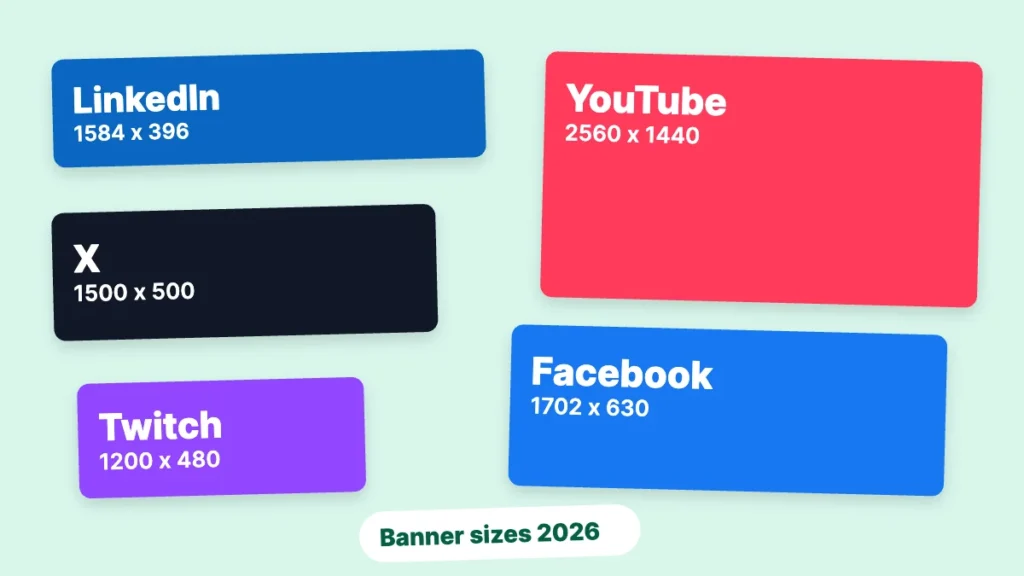
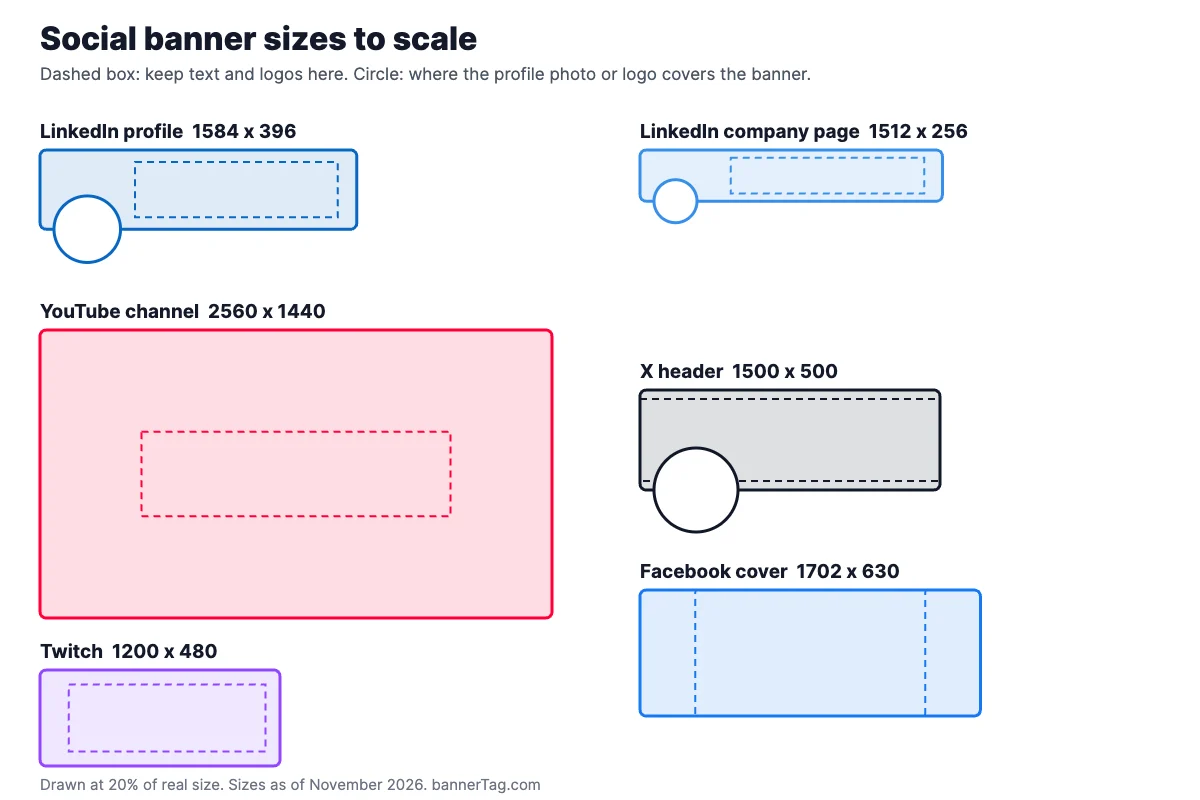
Short version: LinkedIn profile 1584 x 396, YouTube channel 2560 x 1440 (keep text in the middle 1546 x 423), X header 1500 x 500, Facebook cover 1702 x 630, Twitch 1200 x 480. Keep logos and text in the center, away from where the profile photo sits.
| Platform | Size to upload | Safe area for text | Make it |
|---|---|---|---|
| LinkedIn profile banner | 1584 x 396 px (4:1) | Center and right. The profile photo covers the lower left | Open in banner maker |
| LinkedIn company page cover | 1512 x 256 px (new 2026 size; older guides say 1128 x 191) | Center. The logo covers the lower left | Open in banner maker |
| YouTube channel banner | 2560 x 1440 px | Middle 1546 x 423 px, visible on every device | Open in banner maker |
| X (Twitter) header | 1500 x 500 px (3:1) | Center. Phones crop top and bottom | Open in banner maker |
| Facebook page cover | 1702 x 630 px (shown at 851 x 315 on desktop) | Middle two thirds. Phones crop the sides | Open in banner maker |
| Twitch profile banner | 1200 x 480 px | Center | Open in banner maker |
| Bluesky header | 1500 x 500 px | Center | Open in banner maker |
| LinkedIn event cover | 1280 x 720 px (16:9) | Center | Open in banner maker |
Sizes are checked as of November 2026. Platforms change them often, so check the upload screen if something looks off.
| Use | Size | Make it |
|---|---|---|
| Website hero banner | 1920 x 600 px | Open in banner maker |
| Blog featured image / link preview | 1200 x 628 px | Open in banner maker |
| Email newsletter header | 600 x 200 px | Open in banner maker |
| Square social post | 1080 x 1080 px | Open in banner maker |
| Vertical story | 1080 x 1920 px | Open in banner maker |
Looking for ad banner sizes such as 300x250 or 728x90? See the banner ad sizes guide.
- Design for the smallest view. Check how your banner looks on a phone first. Most people will see it there.
- Keep text in the center. Edges get cropped and corners get covered by profile photos, logos and buttons.
- Use big, short text. One line, five to seven words. Banners are seen for a second while people scroll.
- Leave the profile photo area quiet. On LinkedIn and X the photo covers part of the banner, so put plain background there.
- Upload at 2x where you can. Retina screens make small uploads look blurry.
- Use PNG for text and logos, JPG for photos. Keep files under the platform limit (LinkedIn: 8 MB).
- Match your brand. Same colors and fonts as your website and ads, so people recognize you everywhere. See how to make ads people notice.
| Profile type | What works |
|---|---|
| Personal LinkedIn | Your role and the result you help with, plus a contact or website |
| Company page | What you do in one line, a product photo or team photo, your website |
| YouTube channel | Channel promise and upload schedule ("New videos every Tuesday") |
| Shop or brand | Current offer or season, with a clear call to action |
| Event | Date, place and one big reason to attend |
Click any "Open in banner maker" link above and the free banner maker opens at the right size. Pick a design, add your text and download a PNG or JPG. No sign-up and no watermark. Need ad banners in many sizes with prices and slides? Use Banner Studio.
Frequently asked questions
A LinkedIn personal profile banner is 1584 x 396 pixels (4:1). Company page covers use a different, much wider size.
Upload 2560 x 1440 pixels and keep text and logos in the middle 1546 x 423 pixels, the area shown on every device.
What size is an X (Twitter) header?
1500 x 500 pixels (3:1). Keep important content in the center because phones crop the top and bottom.
What size is a Facebook cover photo?
Facebook shows page covers at 851 x 315 pixels on desktop and crops them on phones. Upload 1702 x 630 (twice the size) for sharp results and keep text in the middle.
Open the bannerTag banner maker at the size you need, choose a design, add your text and download a PNG or JPG. No sign-up or watermark.
Sources
- Facebook Help: Page cover photo dimensions
- Digital Applied: Social media image sizes 2026 (YouTube safe area, X header)
- ManyPixels: LinkedIn banner sizes 2026 (company page change)
Updated November 26, 2026.