
AI image tools such as Google's Nano Banana and ChatGPT Images can create a product scene or a background in seconds. It is tempting to ask them for the whole banner. The result often looks great at first glance and falls apart on a closer look: a wrong price, a strange logo, text that does not fit the size you need.
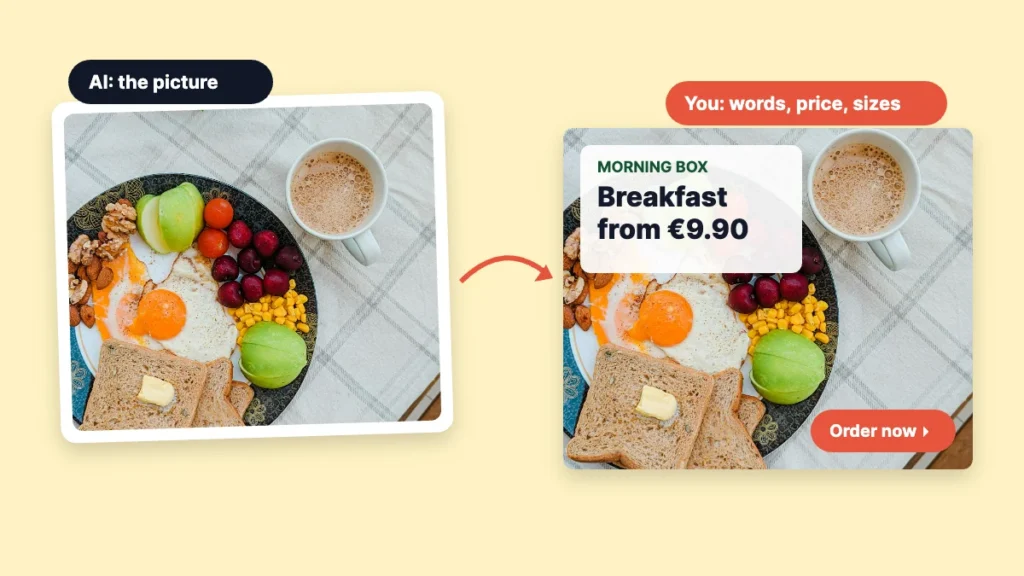
The trick is to use AI for what it is good at and do the rest in a banner tool. Here is the workflow that works.
Short version: let AI make the picture (product scene, background, seasonal props, extra variations) without any text. Then add the headline, price, logo and button in a banner tool such as Banner Studio, which keeps the text sharp and exports every ad size at once. Always check rights, people and the ad platform's rules.
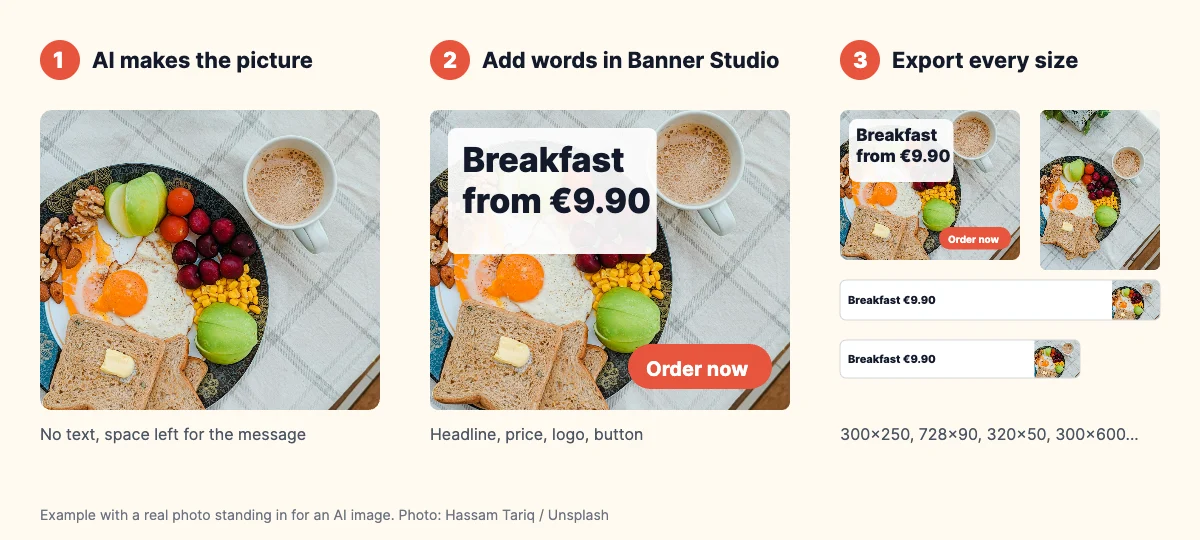
What AI image tools are good at
- Backgrounds and scenes: a sofa in a bright living room, a table with breakfast, a beach at sunset.
- Seasonal versions: the same product with snow, autumn leaves or Easter decorations.
- Extending a photo so a square product shot fits a wide 728x90 or 970x250 banner.
- Fast variations for testing: different colors, angles or settings.
- Cleaning up: removing a messy background or adding soft shadows.
Google's Nano Banana Pro (released November 2025, built on Gemini 3 Pro) improved text inside images, works in 2K and 4K and can combine up to 14 input images. OpenAI's new ChatGPT Images model (December 2025) is faster and follows detailed instructions better. Both are much better than a year earlier.
What still goes wrong
| Problem | Why it matters in ads |
|---|---|
| Wrong or invented text | A misspelled headline or a price of "€19,9O" looks unprofessional and can break ad rules |
| Logos and brand fonts | AI redraws your logo and guesses fonts. Your brand stops looking like your brand |
| Exact sizes | AI gives you one image. Ad campaigns need 300x250, 728x90, 320x50 and more, each with its own layout |
| Small text | Fine print that is legible at 1024 px turns into blur at 300x250 |
| People and products | Hands, faces and product details can look slightly wrong, which hurts trust |
| Rights and rules | Real people, brands and trademarks need permission. Some platforms require AI disclosure |
The workflow that works
- Write a picture-only prompt. Describe the scene, light, angle and empty space, and add "no text, no logos".
- Ask for space for the message. For example "product on the right, plain light background on the left third".
- Make it big and wide. Generate at least 2K and in a wide format, so you can crop for every size.
- Pick and fix. Check hands, faces, product shape and odd details. Regenerate or edit what looks wrong.
- Add the words in a banner tool. Upload the image as the background in Banner Studio, then add the headline, price, logo and button with your brand colors.
- Export all sizes. Banner Studio builds 12 standard sizes from one design, as animated HTML5, PNG or JPG.
Prompt examples you can copy
| Goal | Prompt idea |
|---|---|
| Furniture deal | "Light Scandinavian living room, green velvet armchair on the right, morning sun, plain white wall on the left half, photo style, no text" |
| Bakery | "Top-down photo of fresh croissants and coffee on a light wooden table, empty space at the top, warm light, no text, no logos" |
| Travel | "Wide photo of a smiling person looking up at the sky on a sunny city street, plenty of blue sky on the right, no text" |
| Seasonal | "Same product photo as attached, add soft falling snow and a warm red background, keep the product unchanged, no text" |
Want people in your ads? Faces and smiles work well, but AI faces can look uncanny. Read how to make ads people notice for what works with real people.
Rules and rights checklist
- Do not generate real people, celebrities, brand logos or copyrighted characters.
- Check the AI tool's terms for commercial use. Paid plans often remove visible watermarks; Google adds an invisible SynthID mark to its images.
- Check the ad platform's rules on AI-generated or altered images, especially for political, health and financial ads.
- Keep claims honest: the product in the picture should look like the product people receive.
Try it
Generate a clean background in your favourite AI tool, then open Banner Studio, pick a template and upload it as the background. For a single quick banner, use the simple banner maker. Both are free, with no sign-up and no watermark.
Frequently asked questions
AI image tools can make great pictures for banners, but they still struggle with exact text, prices, logos and the many sizes ad campaigns need. The best results come from using AI for the picture and a banner tool for the text and sizes.
What is Nano Banana?
Nano Banana is the nickname of Google's Gemini image model. Nano Banana Pro, released in November 2025 and built on Gemini 3 Pro, is much better at text in images and supports 2K and 4K output.
Is it legal to use AI images in ads?
Usually yes, if the tool's terms allow commercial use and the image does not copy real people, brands or copyrighted characters. Check each ad platform's rules on AI-generated content.
How do I add text to an AI image for an ad?
Generate the image without text, then upload it as the background in a banner tool such as Banner Studio and add the headline, price, logo and button there.
Sources
- Google: Introducing Nano Banana Pro (November 2025)
- Fortune: OpenAI releases new image model (December 2025)
Updated November 26, 2026.