

Where you put ads matters as much as how many you show. The same site can earn 30% more, or lose readers, depending on its layout. This guide explains where to place ads on your website, with layouts for desktop and mobile, and when to use lazy loading, sticky ads, interstitials, offer walls, rewarded ads, video and native formats.
Four rules for good ad placement
- Viewability first. An ad counts as viewable when at least half of it is on screen for one second (two seconds for video). Advertisers pay more for slots that are seen.
- Content first. Readers came for your content. Ads that push it down or cover it raise bounce rates and lower long-term revenue.
- No layout jumps. Reserve the height of every ad slot so the page doesn’t shift when ads load. See Core Web Vitals and ads.
- Measure revenue per visit. More ads can mean lower prices per ad and fewer pages per visit. Compare setups with page RPM. Our RPM vs CPM vs eCPM guide explains how.
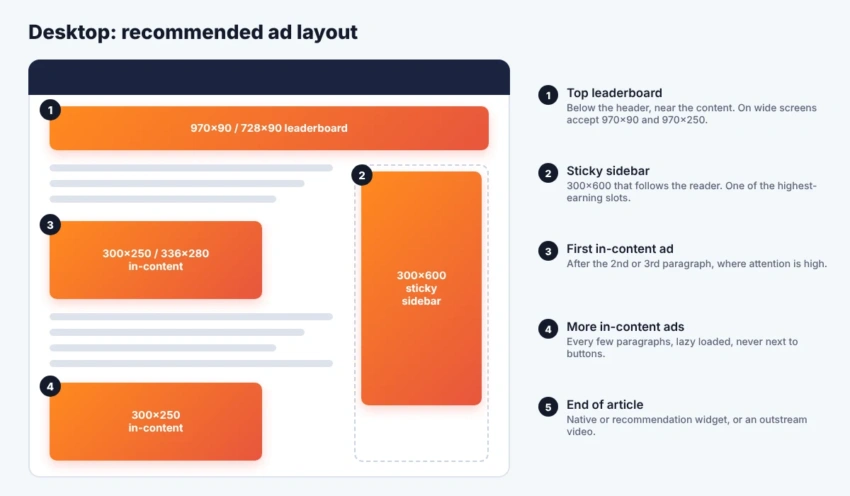
Desktop ad layout
| Slot | Sizes | Why it works |
|---|---|---|
| Top leaderboard | 728×90, 970×90, 970×250 | Seen on every page load, strong brand demand |
| Sticky sidebar | 300×600 with 300×250 fallback | Stays in view while the user reads, often the top earner |
| First in-content ad | 300×250, 336×280 | Placed where attention is highest |
| Further in-content ads | 300×250 | Every few paragraphs on long articles, lazy loaded |
| End of article | Native, recommendations or outstream video | Catches readers who finished the article |
Mobile ad layout
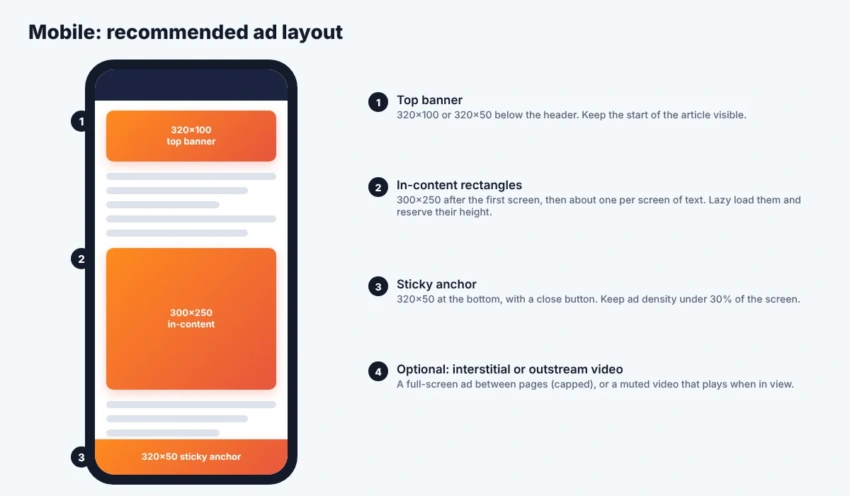
Most visits now come from phones, so the mobile layout usually matters most. Use a small banner at the top, 300×250 rectangles inside the content and a 320×50 sticky anchor at the bottom. The Better Ads Standards say ads should take up less than 30% of the height of a mobile page.
Ad formats and when to use them
| Format | Best for | Earning potential | User experience risk |
|---|---|---|---|
| Standard display | Every site | Medium | Low if placed well |
| Sticky sidebar or anchor | Desktop sidebars, mobile bottom | High | Low to medium |
| Interstitial | Sites with many pages per visit | High | High if overused |
| Offerwall | Premium or high-demand content | Medium | Medium |
| Rewarded ads | Gated content, tools, games and apps | High | Low, because users opt in |
| Instream video | Sites with their own videos | Very high | Low to medium |
| Outstream video | Text-heavy sites | High | Medium |
| Native | Feeds and end of articles | Medium | Low if clearly labelled |
Lazy loading
Lazy loading means an ad slot only requests an ad when the user scrolls close to it. It speeds up the page, saves ad requests that would never be seen and raises viewability, which advertisers reward. Start loading about one screen before the slot, so the ad is ready in time. Google Publisher Tag and Prebid both support lazy loading.
Sticky ads
Sticky ads stay on screen while the user scrolls: a 300×600 that follows the reader in the desktop sidebar, or a 320×50 anchor at the bottom of a phone screen. They are some of the best-paying slots because they stay in view. Keep them small on mobile and add a close button. Large sticky ads are on the Better Ads Standards list of experiences to avoid.
Ad refresh
Refreshing loads a new ad in the same slot after some time. Only refresh slots that are in view and the tab is active, wait at least 30 seconds and check each ad partner’s rules first. Too-fast refresh lowers prices and can count as invalid traffic.
Interstitials
An interstitial is a full-screen ad, such as a 320×480 on mobile. Show it between page views, never as the page loads, and cap it to once every few minutes. Google penalises intrusive pop-ups that cover content as soon as someone arrives from search, and prestitials with a countdown are on the Better Ads list. Google Ad Manager’s web interstitial format is built to stay within these rules.
Offer walls
An offerwall asks the visitor how they want to unlock content: watch a short ad, pay a small amount, answer a survey or sign up for a newsletter. Google launched a free Offerwall in Google Ad Manager in 2025, and TechCrunch reported an average revenue lift of about 9% in Google’s tests. It works best on valuable content that visitors are willing to work for.
Rewarded ads
With rewarded ads the user chooses to watch an ad in exchange for something: access to an article, a download, extra tool uses or in-game items. Because users opt in, completion rates and prices are high. They are standard in mobile apps and games, and also available on the web through Google Ad Manager.
Instream video
Instream ads play before (pre-roll), during (mid-roll) or after (post-roll) your own video content. They earn the highest CPMs of the common formats, but you need regular video content and a video player that supports the VAST standard. If you also publish on YouTube, compare with the YouTube money calculator.
Outstream video
Outstream video lets text sites earn video CPMs without making videos. A player opens inside the article and plays muted when it scrolls into view. Keep it to one player per page, never autoplay with sound (that is on the Better Ads list), and let it collapse when finished.
Native ads
Native ads match the look of your site, such as sponsored cards in a feed or recommendation widgets under articles. They fit well at the end of articles and between list items. Always label them clearly. See native advertising examples.
Ad experiences to avoid
The Coalition for Better Ads tested which formats annoy people most. Chrome can block all ads on sites that keep using them.
| Desktop | Mobile |
|---|---|
| Pop-up ads | Pop-up ads |
| Auto-playing video with sound | Auto-playing video with sound |
| Prestitial ads with a countdown | Prestitial ads |
| Large sticky ads | Large sticky ads |
| Ad density above 30% | |
| Flashing animated ads | |
| Poststitial ads with a countdown | |
| Full-screen scroll-over ads |
How to test your layout
- Change one thing at a time, such as one new slot or a different sidebar size.
- Split traffic between the old and new layout for at least two weeks.
- Compare page RPM, pages per visit, viewability and Core Web Vitals.
- Keep the change only if revenue per visit goes up without hurting engagement.
Estimate the effect of a new layout with the ad revenue calculator, look up exact specs in our banner ad sizes guide and check unfamiliar terms in the ad tech glossary.
Frequently asked questions
How many ads should I put on a page?
There is no fixed number. On desktop, one top banner, a sticky sidebar and an in-content ad every few paragraphs is common. On mobile, keep ads under 30% of the screen height and roughly one in-content ad per screen of text. Test and watch both revenue and engagement.
Where do ads earn the most on a page?
Usually inside the content near where people read, and in sticky positions that stay in view, like the sidebar 300×600 on desktop and the bottom anchor on mobile. Ads that are seen longer get higher bids.
Is lazy loading ads good or bad for revenue?
Usually good. Loading ads only when they are about to be seen raises viewability and keeps pages fast. Start loading a little before the slot appears, so the ad is ready when the user gets there.
Are interstitial ads allowed?
Yes, between pages and with a frequency cap. Avoid full-screen ads that appear before the content or cover it right after a visitor arrives, because they break the Better Ads Standards and can hurt your search rankings.
What is the difference between instream and outstream video?
Instream video ads play before, during or after your own video content. Outstream ads play in their own player inside text content, so you don’t need your own videos.
What is an offerwall?
An offerwall asks the visitor to choose how to unlock content: watch a short rewarded ad, pay a small amount, answer a survey or sign up. Google Ad Manager includes a free Offerwall feature.
Conclusion
Good ad placement puts ads where people actually look, keeps them in view and never gets in the way of the content. Start with a solid desktop and mobile layout, add lazy loading and sticky slots, then test special formats like outstream video, rewarded ads or an offerwall one at a time. Let revenue per visit, not the number of ads, decide what stays.