

Ads pay the bills, but they are also the most common reason a website fails Google’s Core Web Vitals. Pages jump when banners appear, scripts block taps, and visitors leave before the first ad is seen. The good news is that you do not have to choose between speed and revenue.
In this guide we explain the three metrics in simple words, show how ads affect each one and give practical fixes that keep your earnings.
The three Core Web Vitals
| Metric | What it measures | Good | Poor |
|---|---|---|---|
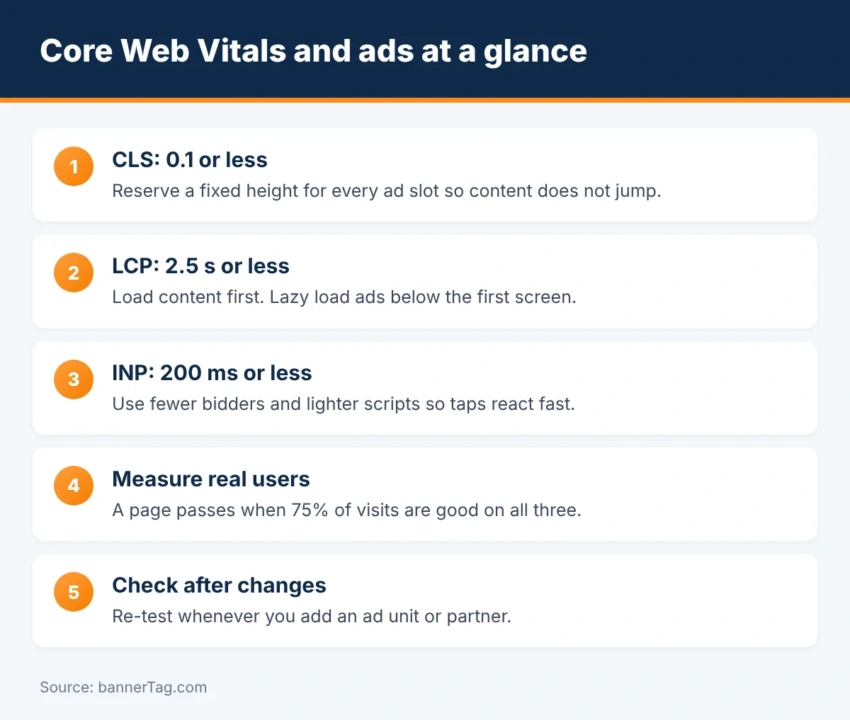
| LCP (Largest Contentful Paint) | How fast the main content appears | 2.5 s or less | More than 4 s |
| INP (Interaction to Next Paint) | How fast the page reacts to taps and clicks | 200 ms or less | More than 500 ms |
| CLS (Cumulative Layout Shift) | How much the page jumps while loading | 0.1 or less | More than 0.25 |
Google measures these on real visitors. A page passes when at least 75% of visits are in the “good” range for all three.
CLS: stop ads from pushing content
Layout shift is the problem ads cause most often. The ad slot starts empty with no height. Then the ad arrives, and everything below it moves down. If the visitor was about to tap a link, they tap the ad instead. That is bad for users and can even lead to invalid clicks.
- Reserve the space. Give every ad container a fixed
min-height. For a slot that can show 300×250 or 336×280, reserve 280 pixels. - Plan for multi-size slots. Reserve the height of the largest size, or of the size that fills most often.
- Do not collapse empty slots at the top. If no ad is returned, keep the space or show a house ad.
- Avoid inserting ads above content after the page has loaded. Sticky ads at the bottom of the screen are safer.
- Be careful with auto ads. Automatic placements can add ads in places where no space was reserved.
.ad-slot { min-height: 280px; display: flex; justify-content: center; align-items: center; }
@media (min-width: 768px) { .ad-slot--top { min-height: 90px; } }
Not sure which sizes fit where? See every format to scale in our banner ad sizes guide.
LCP: let the content load first
LCP gets worse when ad scripts compete with your main image or headline for the network and the processor.
- Load ad scripts asynchronously, so they never block the page.
- Do not lazy load the main image. Mark it as high priority instead.
- Lazy load ads below the fold. They do not need to load before the visitor scrolls.
- Avoid a large ad as the first element on mobile. If the ad is the largest thing on screen, it becomes your LCP.
- Use a CDN and page caching, so the HTML arrives fast.
INP: keep the page responsive
INP replaced First Input Delay in 2024. It looks at every tap and click during the visit, not only the first one. Heavy JavaScript is the main enemy, and ad tech brings a lot of it.
- Limit the number of bidders. Every header bidding partner adds code. Keep the ones that win auctions and remove the rest.
- Set a sensible auction timeout. Around 1,000 to 1,500 ms is common on the web.
- Move bidders server-side where possible. Read server-side header bidding explained.
- Refresh ads carefully. Refresh only viewable slots, and not more often than every 30 seconds.
- Delay non-essential scripts such as comments, chat widgets and social embeds until the visitor scrolls.
Does better speed mean less revenue?
Usually it is the opposite. Lazy loading raises viewability, because ads load when they are about to be seen. Fewer, better bidders often earn the same with less delay. In addition, a faster page keeps more visitors, so more ads are actually shown. Measure page RPM before and after each change with the CPM calculator.
How to measure
- PageSpeed Insights. Shows real-user data when available, plus a lab test.
- Search Console. The Core Web Vitals report groups pages with the same problem.
- Chrome DevTools. The Performance panel shows which element shifted and which script was slow.
- Google Publisher Console. Shows how long each ad slot took to load.
Quick checklist
- Every ad slot has a reserved height.
- Ads below the first screen are lazy loaded.
- The main image is not lazy loaded.
- Ad scripts are async.
- Bidders that rarely win are removed.
- Ad refresh is limited to viewable slots.
- You re-test after adding any new ad unit or partner.
Frequently asked questions
Do ads hurt Core Web Vitals?
They can. Ads are the most common cause of layout shifts, and ad scripts add work for the browser. However, with reserved space, lazy loading and a sensible number of partners, a site with ads can pass all three metrics.
How do I stop ads from causing layout shift?
Reserve the space before the ad loads. Give every ad container a fixed min-height that matches the biggest size the slot can show, and never insert ads above content the visitor is already reading.
Should I lazy load ads?
Yes, for ads below the first screen. They load only when the visitor scrolls near them, which speeds up the page and improves viewability. Load the first visible ad normally.
Does Google rank slow sites lower?
Core Web Vitals are part of Google’s page experience signals. Content relevance matters much more, but when two pages are similar, the faster and more stable one has an advantage.
What is a good INP score?
200 milliseconds or less. Between 200 and 500 needs improvement, and above 500 is poor.
Conclusion
Ads and Core Web Vitals can live together. Reserve space to fix CLS, let content load first to fix LCP, and cut heavy scripts to fix INP. Each step also tends to raise viewability, so a faster site is often a better-earning site too. For more layout ideas, read how to put ads on a website.