

You probably already have an ads.txt file. But do you know how buyers actually use it? On its own, ads.txt only tells half the story. The other half is sellers.json, a file published by your ad partners. Together they let advertisers check who really sells your ad space and whether they should bid.
In this guide we explain how ads.txt and sellers.json work together, what every field means and how to fix the mismatches that quietly cost publishers money.
Ads.txt vs sellers.json in one minute
| ads.txt | sellers.json | |
|---|---|---|
| Who publishes it | The publisher (you) | The ad system (SSP, exchange, network) |
| Where it lives | yoursite.com/ads.txt | adsystem.com/sellers.json |
| What it says | “These companies may sell my ad space” | “These are the sellers in our system” |
| Format | Plain text, one line per partner | JSON file with a list of sellers |
| Launched | 2017 (version 1.1 in 2022) | 2019, with the SupplyChain Object |
In short, ads.txt is your list of authorized sellers. sellers.json is each partner’s list of the publishers and resellers it works with. When both lists agree, buyers trust the inventory.
What is sellers.json?
sellers.json is a standard from the IAB Tech Lab. Every SSP, ad exchange and ad network should publish one. It lists every account that can sell inventory through that system, with the seller’s ID, name and domain.
Here is a simplified example of one entry:
{
  "seller_id": "pub-1234567890123456",
  "seller_type": "PUBLISHER",
  "name": "Example Media Ltd",
  "domain": "example.com"
}
The main sellers.json fields
| Field | Meaning |
|---|---|
| seller_id | The account ID. It must match the ID in your ads.txt line. |
| seller_type | PUBLISHER, INTERMEDIARY or BOTH. |
| name | The legal or business name of the seller. |
| domain | The seller’s business domain. It should match OWNERDOMAIN or MANAGERDOMAIN in ads.txt. |
| is_confidential | Set to 1 when the name and domain are hidden. |
| is_passthrough | Shows that an intermediary passes payments straight to the publisher. |
How buyers verify an impression
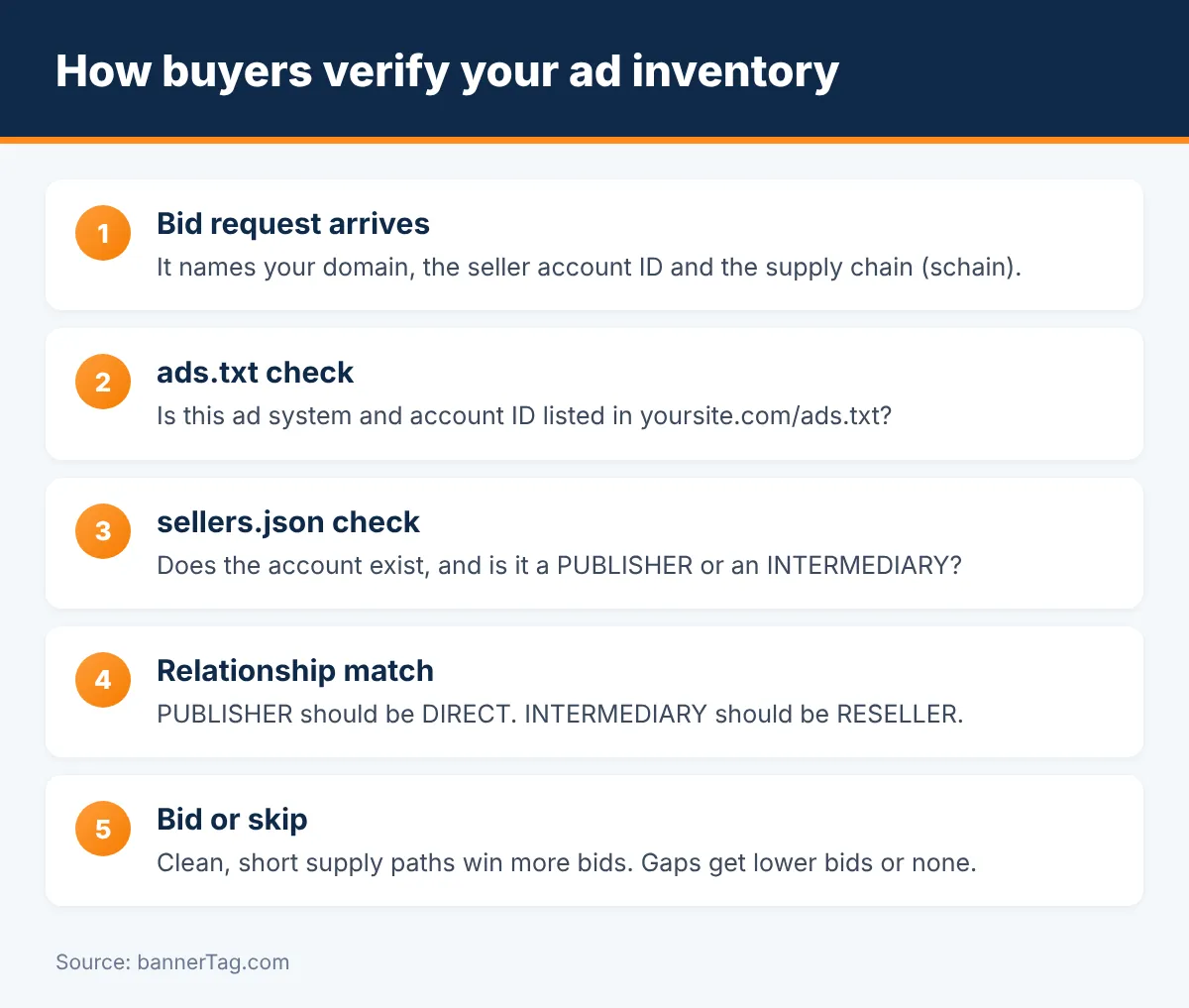
When your page loads an ad, the bid request travels from your site through one or more ad systems to the buyer. Before the buyer bids, its DSP runs a series of checks. Here is what happens, step by step:
- The bid request arrives. It names your domain and the selling account ID. It also carries the SupplyChain Object (schain), a list of every company that handled the request.
- The DSP reads your ads.txt. Is there a line with this ad system and this account ID? If not, the seller is unauthorized.
- The DSP reads the ad system’s sellers.json. Does the account exist? Is it a PUBLISHER or an INTERMEDIARY?
- The relationship is compared. A PUBLISHER account should be DIRECT in ads.txt. An INTERMEDIARY should be RESELLER.
- Each schain step is checked. Every company in the chain should appear in the next company’s sellers.json.
- The buyer decides. Clean, short paths win more bids. Paths with gaps get lower bids or none at all.
As a result, a single wrong ID in ads.txt can make a whole partner invisible to some buyers. In addition, many buyers prefer the shortest path to your inventory, which is called supply path optimization (SPO).
Ads.txt 1.1: OWNERDOMAIN and MANAGERDOMAIN
In 2022 the IAB Tech Lab released ads.txt 1.1. It added two variables that connect ads.txt even more closely to sellers.json:
- OWNERDOMAIN names the business that owns the website, for example
OWNERDOMAIN=example.com. It should match the domain field of your PUBLISHER entries in sellers.json. - MANAGERDOMAIN names a company that manages your monetization, for example
MANAGERDOMAIN=partner.com. You can also limit it to one country, such asMANAGERDOMAIN=partner.com, DE.
These lines help buyers group sites by owner and find the most direct path. Therefore it is worth adding OWNERDOMAIN even if you only run one website. Our free ads.txt generator adds both variables in the right format.
The most common mismatches (and how to fix them)
| Problem | What buyers see | How to fix it |
|---|---|---|
| Wrong or old account ID in ads.txt | Unauthorized seller | Copy the exact line from the partner’s dashboard |
| DIRECT in ads.txt, INTERMEDIARY in sellers.json | Relationship mismatch | Ask the partner which is right, usually RESELLER |
| Same account as both DIRECT and RESELLER | Unclear relationship | Keep only the correct line |
| Domain in sellers.json differs from OWNERDOMAIN | Owner cannot be confirmed | Update OWNERDOMAIN or ask the partner to fix your domain |
| Confidential seller entry | Less transparency | Make your seller info visible where possible |
| Lines for partners you left | Unnecessary risk | Remove unused lines every quarter |
| Google ID with “ca-pub” | Invalid line | Use pub- followed by 16 digits |
You can find most of these problems automatically. Our ads.txt checker reads your live file and compares every account ID with each partner’s sellers.json.
How to check your own entries
- Open your ads.txt. Go to yoursite.com/ads.txt and make sure it loads as plain text.
- Pick a partner line. Note the ad system domain and your account ID.
- Open the partner’s sellers.json. Search for your account ID.
- Compare. Check that the seller type fits your relationship and that the domain is yours or your manager’s.
- Repeat for every partner, or let the checker do it in one click.
Google AdSense and sellers.json
Google publishes its sellers.json at realtimebidding.google.com/sellers.json. By default, some AdSense accounts are listed as confidential. You can change this in AdSense under Account → Settings → Account information → Seller information visibility. Making your business name and domain visible helps buyers verify your inventory, which is why Google recommends it.
In addition, check that your ads.txt uses Google’s correct line: google.com, pub-0000000000000000, DIRECT, f08c47fec0942fa0, with your own 16-digit ID. If you use Google through a partner, that partner’s line will usually be RESELLER. For more AdSense setup help, read how to place AdSense ads.
What about app-ads.txt?
app-ads.txt works the same way for mobile and CTV apps. The file is placed on the developer website that is listed in the app store. Buyers then match it with sellers.json exactly like they do for websites. The format is identical, so the same rules apply.
Ads.txt and sellers.json checklist
- Your ads.txt loads at the root of your domain as text/plain.
- Every partner line uses the exact account ID from that partner.
- DIRECT and RESELLER match the seller type in sellers.json.
- OWNERDOMAIN is set to your business domain.
- MANAGERDOMAIN is set if a company manages your ads.
- No duplicate lines and no account listed as both DIRECT and RESELLER.
- Old partners are removed.
- Your seller information is visible, not confidential, where possible.
- You run a check after every partner change and once per quarter.
Working with many partners through header bidding? Then your file grows quickly, and this checklist matters even more.
Frequently asked questions
Do publishers need to create a sellers.json file?
Usually not. sellers.json is published by ad systems such as SSPs, exchanges and networks. Publishers only need their ads.txt file. However, if you sell inventory for other sites, for example as a network, you should publish your own sellers.json.
Where can I find a sellers.json file?
It sits at the root of the ad system’s domain, for example ssp.com/sellers.json. Google’s file is at realtimebidding.google.com/sellers.json.
What does seller_type BOTH mean?
BOTH means the company sells its own inventory and also resells inventory for others. Buyers then treat the ads.txt relationship as DIRECT or RESELLER depending on the specific site.
Should my AdSense seller information be confidential?
You can choose in AdSense under Account, Settings, Account information. Making your name and domain visible helps buyers verify your inventory, so most publishers choose transparent.
How often should I check my ads.txt and sellers.json entries?
Check them whenever you add or remove a partner, and do a full review at least every quarter. Remove partners you no longer work with, because unused lines add risk.
What is the SupplyChain Object (schain)?
It is a list attached to each bid request that shows every company that handled the impression. Buyers compare each step with ads.txt and sellers.json to confirm the path is authorized.
Conclusion
ads.txt says who may sell your inventory, and sellers.json says who those sellers really are. Buyers compare both, along with the supply chain, before they bid. Keep your IDs exact, your relationships consistent and your OWNERDOMAIN set. Then check everything regularly. It takes a few minutes, and it keeps every buyer able to bid on your ads.