
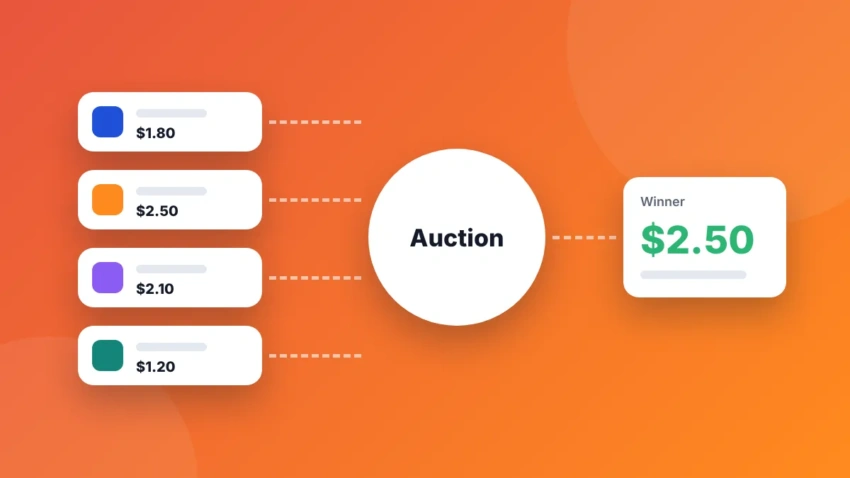
Prebid.js is the open-source library behind most header bidding setups on the web. It lets many ad exchanges bid for your ad space at the same time, before your ad server picks a winner. In this beginner guide we explain what you need, how the pieces fit together and how to get a first setup running.
New to the idea? Read header bidding explained in simple terms first. Then come back here.
What you need before you start
- An ad server. Most publishers use Google Ad Manager. See Google Ad Manager for small publishers.
- Bidder accounts. You need to be approved by each SSP you want to add. Browse our list of header bidding partners.
- Access to your site’s code, or a developer who can add scripts to the page head.
- A consent tool for European visitors. See Google consent requirements for publishers.
- An up-to-date ads.txt. Every bidder gives you lines to add.
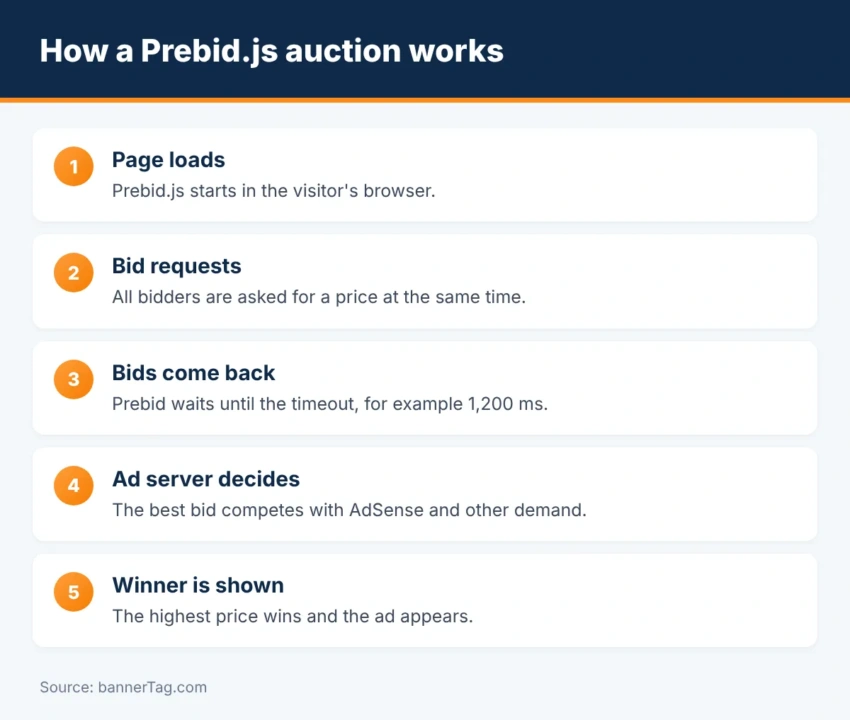
How a Prebid auction works
- The page loads and Prebid.js starts.
- Prebid sends bid requests to all your bidders at once.
- Bidders answer with a price and an ad, or with no bid.
- When all bids are in, or the timeout ends, Prebid picks the best bid for each slot.
- Prebid passes the price to your ad server as key-values, for example
hb_pb=2.50. - The ad server compares it with its own demand, such as AdSense or Ad Exchange.
- The highest price wins and the ad is shown.
Step 1: Download Prebid.js
Go to the download page on prebid.org. Select only the bidder adapters and modules you need, and download your custom file. A smaller file loads faster. At the time of writing Prebid.js is on version 11, and new releases appear almost every week, so plan to update a few times a year.
Step 2: Define your ad units
An ad unit tells Prebid which slot is for sale, which sizes it accepts and which bidders may bid. Here is a simplified example with placeholder IDs:
var adUnits = [{
  code: 'div-top-banner',
  mediaTypes: { banner: { sizes: [[728, 90], [970, 90]] } },
  bids: [
    { bidder: 'bidderA', params: { placementId: '12345' } },
    { bidder: 'bidderB', params: { siteId: '67890' } }
  ]
}];
Each bidder has its own parameter names. You find them in the bidder’s page in the Prebid documentation.
Step 3: Configure and request bids
pbjs.que.push(function () {
  pbjs.setConfig({ bidderTimeout: 1200, priceGranularity: 'medium' });
  pbjs.addAdUnits(adUnits);
  pbjs.requestBids({
    bidsBackHandler: function () {
      pbjs.setTargetingForGPTAsync();
      googletag.pubads().refresh();
    }
  });
});
bidderTimeout is how long Prebid waits for answers. priceGranularity decides how bids are rounded, for example in steps of $0.10.
Step 4: Set up the ad server
Your ad server needs line items that match the prices Prebid sends. In Google Ad Manager you create a set of price-priority line items, one for each price step, that target the hb_pb key. Each one uses the Prebid creative code. With medium granularity that means about 200 line items, so most people create them with a script or tool.
Step 5: Add consent, ads.txt and identity
- Consent. Turn on Prebid’s consent modules (TCF for Europe, GPP for the US), so bidders receive the visitor’s choice.
- ads.txt. Add every bidder’s lines. Build the file with our ads.txt generator and test it with the ads.txt checker.
- Supply chain. Configure the schain module if a partner asks for it. Learn more in our ads.txt and sellers.json guide.
- User IDs. Identity modules can raise bids, but add them only with valid consent.
Step 6: Test your setup
- Add
?pbjs_debug=trueto your page address and open the browser console to see the auction. - Type
pbjs.getBidResponses()in the console to list the bids. - Use a helper extension. See our list of useful header bidding Chrome extensions.
- Check in the ad server that Prebid line items deliver.
Common beginner mistakes
- Too many bidders. More partners do not always mean more money, and they slow the page.
- A very long timeout. Ads appear late and viewability drops.
- Missing ads.txt lines. Buyers will not bid on unauthorized inventory.
- No reserved ad space. Late ads push content around. Read Core Web Vitals and ads.
- Never updating Prebid. Old versions miss bidder fixes and privacy updates.
Should you do it yourself?
Running Prebid yourself gives full control and no revenue share. However, it takes real technical time: updates, new bidders, price floors and troubleshooting. Many small and mid-size publishers therefore use a managed wrapper or a monetization partner that runs Prebid for them. Compare your options in AdSense vs header bidding.
Frequently asked questions
Is Prebid.js free?
Yes. Prebid.js is open source and free to use. You pay nothing for the software, but you need accounts with the bidders (SSPs) you add, and usually an ad server such as Google Ad Manager.
Do I need Google Ad Manager to use Prebid?
It is the most common setup, but not the only one. Prebid works with other ad servers, and it can also run without one for simple cases.
How many bidders should I use?
Start with three to five. Each bidder adds code and network requests. After a few weeks, keep the ones that win auctions and remove the rest.
What timeout should I set in Prebid?
Most web publishers use between 1,000 and 1,500 milliseconds. A longer timeout collects more bids but delays the ads.
How much traffic do I need for header bidding?
There is no official minimum, but most SSPs want to see steady traffic before they approve you. Many publishers start when they reach a few hundred thousand pageviews a month, or they join through a monetization partner earlier.
Conclusion
A basic Prebid.js setup has four parts: the library, your ad units, a few bidders and matching line items in the ad server. Start small, test with debug mode and add partners one at a time. Then measure the result per bidder and keep what works.