

If you show Google ads to visitors from Europe, a cookie banner is no longer optional. The Google consent requirements for publishers are clear, and they got stricter again in 2026. Sites that do not follow them lose personalized ads, and with them a large part of their European revenue.
In this guide we explain in simple terms what Google asks for, what a certified CMP is, what changed with TCF v2.3 and how to check that your setup works. This is general information and not legal advice.
What Google requires in 2026
- Get consent in the EEA, the UK and Switzerland. Google’s EU user consent policy asks you to collect consent for cookies and for personalized ads.
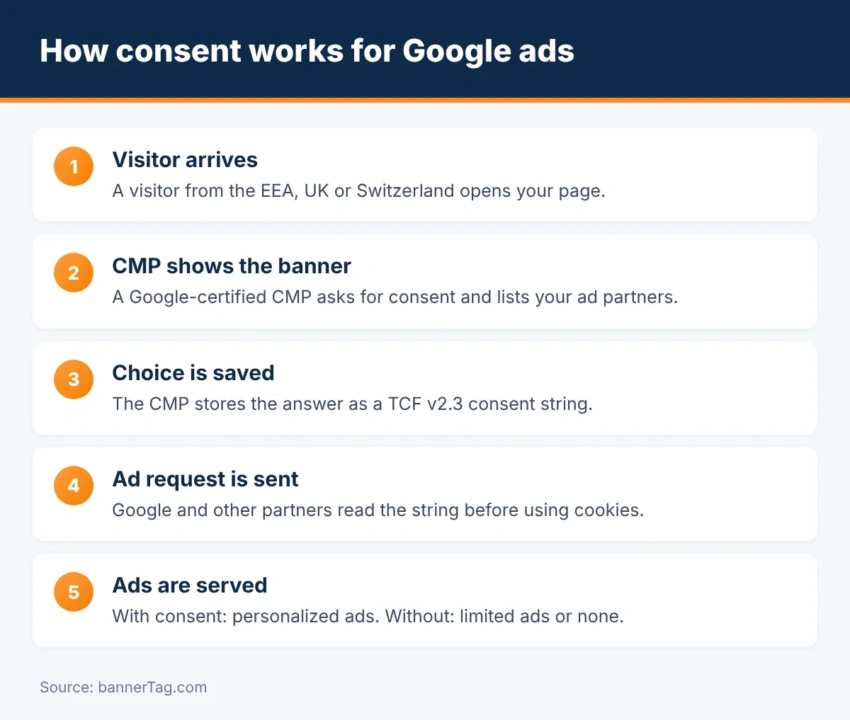
- Use a Google-certified CMP. A consent management platform (CMP) is the tool that shows the banner and stores the choice. Since January 2024 it must be certified by Google and integrated with the IAB Transparency and Consent Framework (TCF) if you use AdSense, Ad Manager or AdMob.
- Send a valid TCF v2.3 consent string. Google has enforced the new version since March 2026.
- Pass consent signals to Google’s tags. For Analytics and Google Ads this is done with Consent Mode v2.
What is a Google-certified CMP?
A CMP shows the consent message, records what the visitor chose and turns it into a small piece of text called the TC string. Ad partners read this string before they set cookies or personalize ads. Google keeps a public list of certified CMPs, and it only accepts consent that comes from one of them.
You have two options. First, you can use Google’s own consent message in the Privacy & messaging tab of AdSense or Ad Manager. It is free and certified. Second, you can use a third-party CMP such as Cookiebot, CookieYes, Usercentrics, OneTrust, Didomi or Quantcast Choice. These offer more design options and often cover more privacy laws.
TCF v2.3: what changed
IAB Europe updated the framework to version 2.3, and Google set a deadline of 1 March 2026. The main change is a required disclosed vendors section in every TC string. It lists the vendors that were actually shown to the user, and it must include Google (vendor ID 755).
According to PPC Land, strings created before the deadline stay valid, but new ones must follow v2.3. If the section is missing or wrong, Google reports error 1.4 and may serve only limited ads or drop the request. Most CMPs updated automatically. However, it is worth checking that yours did.
What happens without valid consent
| Situation | What Google serves | Effect on revenue |
|---|---|---|
| Valid consent for personalized ads | Personalized ads | Full revenue |
| Consent for basic ads only | Non-personalized ads | Lower |
| No consent, or invalid TC string | Limited ads or no ads | Much lower |
| No certified CMP for EEA/UK/Swiss users | No personalized ads | Much lower |
Limited ads use no cookies and no personal data. Fewer buyers bid on them, so prices are much lower. Therefore a broken consent setup can quietly cut your European earnings.
Consent Mode v2 in brief
Consent Mode is how your site tells Google’s tags what the visitor chose. Version 2 added two signals, ad_user_data and ad_personalization, and Google has required it since March 2024 for advertisers who use audiences and conversion tracking in Europe. If you use a certified CMP with TCF, it can usually set Consent Mode for you.
What about visitors from the United States?
The US has no single privacy law, but many states now have their own. Most give users a right to opt out instead of asking for consent first. Publishers usually handle this with a “Do not sell or share my personal information” link, and they pass the choice to partners through the IAB Global Privacy Platform (GPP). Google’s Privacy & messaging tool also includes a US states message.
How to set it up, step by step
- Pick a CMP. Start with Google’s free tool if you only run AdSense. Choose a third-party CMP if you use header bidding or many partners.
- Create the European message. Add your logo, your partners and a link to your privacy policy.
- Offer a real choice. Regulators expect it to be as easy to refuse as to accept.
- List your ad partners. Keep the vendor list in line with your ads.txt and sellers.json partners.
- Test it. Open your site with a European IP address or VPN, make a choice, and check that ads still load.
- Watch the reports. AdSense and Ad Manager show TCF errors in the Privacy & messaging and policy sections.
Checklist
- A Google-certified CMP is live for EEA, UK and Swiss visitors.
- The CMP supports TCF v2.3 and lists Google as a vendor.
- “Reject” is as easy to click as “Accept”.
- Consent Mode v2 is active for Google tags.
- US visitors can opt out where state laws require it.
- Your privacy policy names your ad partners.
- You re-test after every change to ads or plugins.
Working with several ad partners through header bidding? Then the CMP must load before the auction starts, so that every bidder receives the consent string.
Frequently asked questions
Yes, if you have visitors from the European Economic Area, the UK or Switzerland. Google’s EU user consent policy requires you to get consent for cookies and personalized ads, and to use a Google-certified CMP that works with the IAB TCF.
What happens if I do not use a certified CMP?
Google will not serve personalized ads to your European visitors. You may get only limited ads, which earn much less, or no ads at all for those requests.
Is Google’s own consent tool free?
Yes. The Privacy & messaging tab in AdSense, Ad Manager and AdMob includes a free, Google-certified consent message that supports the TCF.
What is TCF v2.3?
It is the latest version of IAB Europe’s Transparency and Consent Framework. Its main change is a required “disclosed vendors” section in every consent string. Google has enforced it since March 2026.
Usually not an opt-in banner. However, several US states give users the right to opt out of the sale or sharing of their data, so many publishers show a “Do not sell or share” link and pass the choice to ad partners through the IAB Global Privacy Platform.
Conclusion
Google’s consent requirements come down to three things: ask European visitors for consent, use a certified CMP, and send a valid TCF v2.3 string. Set it up once, test it with a European connection and check your reports after every change. That protects both your visitors’ privacy and your ad revenue.